10 Canva Mood Board Templates for Faster Design
Building a strong visual foundation for a project often starts with a mood board, but the process of arranging images, colors, and text can eat up valuable creative time. You have the vision, but dragging and resizing elements until they look cohesive feels tedious. The Canva 10 Mood Board Templates collection changes that dynamic. It is not just a set of static layouts; it is a workflow upgrade designed for the modern designer, entrepreneur, or content creator. By leveraging modern typography and flexible grid systems, these templates allow you to build professional visual boards in minutes rather than hours.
A Practical Approach to Visual Strategy
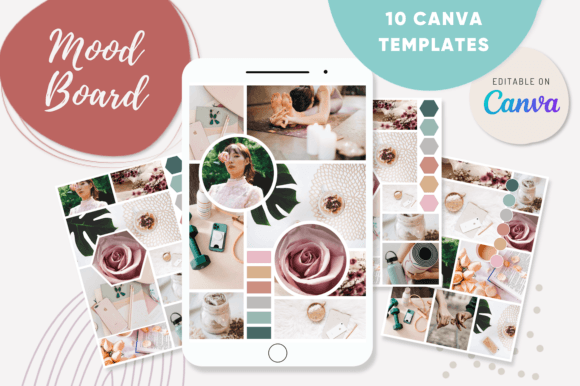
When you open the project file, you gain access to 10 distinct layouts that serve as the structural backbone of your board. These are not arbitrary shapes. They are carefully constructed grids that balance negative space with imagery. You will find that the aesthetic is clean and professional, avoiding the clutter that often plagues DIY boards. The overall appeal lies in this simplicity. Whether you are working on a brand identity for a client or mapping out the aesthetic for a personal blog, the structure supports your content without overwhelming it.
The package includes two distinct sets of files. The first set consists of the 10 templates with placeholders. These are your working files. The placeholders indicate exactly where your hero images, texture swatches, and typography samples should go. The second set offers 10 as examples. These finished boards show you exactly how the templates look when filled with high-quality content. Studying these examples helps you understand the visual hierarchy and how to use whitespace effectively. It is like having a creative director looking over your shoulder, offering guidance on composition.
Integrating Typography and Brand Assets
A mood board is rarely just about photos; it is about how text and images interact. These templates are built with web design and editorial design principles in mind. The text blocks are sized to accommodate everything from bold display font headers to smaller descriptive paragraphs. This makes it easy to test font pairing ideas directly on the board. For instance, you can drop a serif font sample next to a sans serif font sample to see how they vibe with your chosen color palette.
Consider a scenario where you are developing packaging design for a boutique candle brand. You might use the board to visualize how a script font or handwritten font looks against a textured paper background. Because the templates are fully editable in Canva, you have the freedom to adjust text colors and sizes instantly. This flexibility is crucial for small business owners who need to see how their brand identity translates across different mediums. The ability to visualize premium font choices alongside physical textures ensures that your final design assets are cohesive.
Streamlining the Creative Workflow
The primary utility of the Canva 10 Mood Board Templates is speed. The drag-and-drop interface of Canva is intuitive, but starting with a structured template removes the guesswork. You do not need to be a technical expert to use them. If you are a marketer preparing a campaign pitch or a blogger defining a new visual direction, you can simply upload your images and drop them into the pre-made frames.
The download process is straightforward. You receive a PDF with the link to the templates. Once you click the link, the project opens directly in your Canva account. From there, the customization options are limitless. You can change background colors to match specific hex codes, add text overlays to describe the "vibe" of a project, or upload your own logos. For hobbyists and crafters, this is a fantastic way to organize inspiration for physical projects, such as interior design or scrapbooking. For professionals, it serves as a powerful communication tool to align with clients on the creative direction before moving into high-fidelity mockups.
Ultimately, these templates bridge the gap between a scattered collection of ideas and a professional presentation. They help you maintain consistency across your social media graphics and marketing materials. By using these boards, you ensure that every visual element—from the style of photography to the choice of a creative font—works in harmony to tell your story. It is a simple, effective way to bring clarity to the creative process.