Corporate Web Ads Banner Templates: A Practical Guide
The Foundation of Consistent Digital Marketing
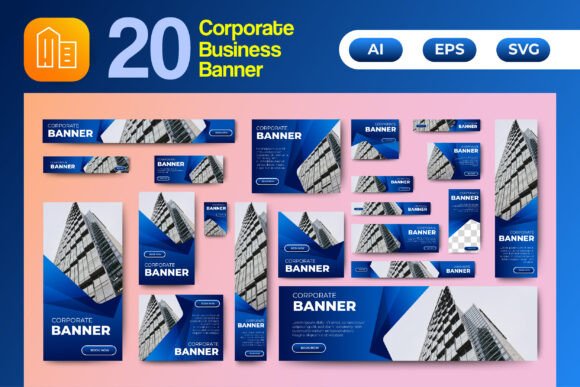
Every business, from a lean startup to an established corporation, faces the same challenge: creating professional, cohesive advertising that doesn't consume the entire marketing budget. This is where a solid set of Corporate Web Ads Banner Templates becomes an indispensable asset. Think of them not as a restrictive cage, but as a reliable framework that ensures your brand looks sharp and intentional across every platform. This particular set includes vertical, horizontal, and square formats, covering the standard sizes you'll encounter for Google Display Network, social media sidebars, and website headers. The visual personality here is one of clean, modern professionalism. The templates provide a clear hierarchy—a designated space for your headline, your key message, and a call-to-action—paired with a placeholder for a high-impact image. The color schemes are designed to be eye-catching without being garish, offering a balanced palette that can be adapted to your brand's identity.
The true value lies in the vector-based design. Because the source files (AI, EPS, and SVG) are fully editable and organized into layers, you're not just getting static images. You're getting a customizable design system. The 300 PPI resolution and RGB color mode mean the assets are prepared for both crisp digital display and high-quality print. This isn't about finding a one-off graphic; it's about equipping yourself with a versatile toolkit for your brand identity. The templates are isolated from their background, making it straightforward to drop in your own product shots or brand photography, ensuring the final result feels uniquely yours.
Where These Templates Solve Real Problems
Imagine you're launching a new service. You need a coordinated set of visuals: a Facebook cover, a LinkedIn banner, a Twitter header, and a series of web ads in various sizes. Starting from scratch each time leads to inconsistency and wasted hours. With these Corporate Web Ads Banner Templates, you establish your visual language once—choosing your colors, fonts, and image style—and then apply it uniformly across every required format. This consistency is fundamental to building brand recognition. Your audience starts to associate that specific color combination or layout style with your business, which is a core tenet of effective marketing.
The applications extend far beyond digital ads. These templates are perfectly suited for creating a cohesive look for your social media graphics. Use the square format for an Instagram post that promotes a blog article, then use the vertical template for a corresponding Instagram Story. The horizontal design can become a stunning YouTube thumbnail or the cover image for your next online project. For entrepreneurs and small business owners, this asset is a workhorse. It can streamline the creation of promotional materials for a local event, a sale announcement, or the visual identity for a new product line. The principle of font pairing and visual hierarchy is already built into the structure, guiding you toward a balanced and readable design even if you're not a seasoned graphic designer.
Integrating Templates into Your Creative Workflow
Choosing to use a template set like this is a strategic decision about efficiency and quality. The key is to see it as a starting point, not the final product. When you open the source file, your first step should be to customize it. Replace the placeholder colors with your brand's exact hex codes. Swap the generic image placeholder with a photograph of your team, your product, or a relevant lifestyle image that tells your brand's story. Adjust the copy to reflect your specific offer. The organized layers make this process intuitive, allowing you to move, resize, and edit individual elements without disrupting the overall design.
A practical tip: before committing to a template for a major campaign, test it. Create a draft with your actual content and view it at the intended size, both on a desktop and a mobile device. Check the readability of the text. Does the headline stand out? Is the call-to-action button clear and compelling? This is where the high-quality vector design shines—you can scale elements up or down without losing clarity. For businesses that require a variety of design assets, having a consistent template set ensures that your web design elements, social media graphics, and even print designs like posters or flyers all speak the same visual language. It’s a practical approach to maintaining a professional brand identity across every touchpoint, saving time and reinforcing your message with every piece of content you publish.