Professional ID Photo & Frame Templates for Every Document
Getting the perfect identification photo often feels like a frustrating chore. Between strict government requirements, expensive photo booth visits, and the challenge of getting a clean, compliant shot, the process can be time-consuming. This is where a versatile toolkit of ID Photo & Frame Templates becomes an essential design asset for anyone from small business owners to individual applicants. These templates are pre-sized, professionally designed frames that ensure your photos meet the exact specifications for a wide range of official documents, saving you time and ensuring compliance.
Understanding the Template Sizes and Their Common Uses
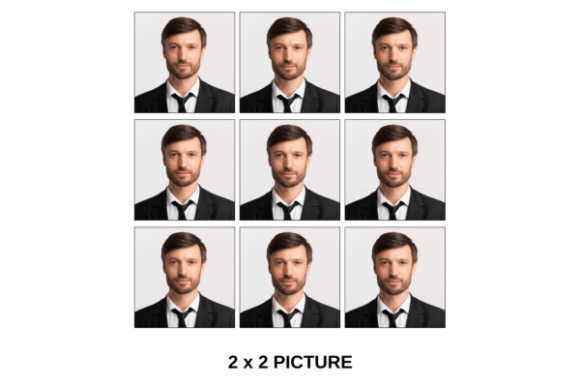
The core value of this collection lies in its comprehensive range of sizes, covering the most common requirements for personal and professional documents. The 1x1 and 2x2 inch templates are the standards for United States passports, visas, and many government-issued IDs like driver's licenses. The PASSPORT template is specifically optimized for international travel documents, adhering to the precise facial recognition and background guidelines set by the International Civil Aviation Organization (ICAO). Moving into print sizes, 2R (2.5x3.5 inches) is the classic wallet-sized photo, perfect for school IDs or membership cards. The 3R (3.5x5 inches) is a step up, suitable for employee badges or informal portraits.
The larger formats in the collection extend the utility beyond simple identification. Sizes like 4R (4x6 inches), 5R (5x7 inches), and 6R (6x8 inches) are standard photographic print dimensions, ideal for creating professional headshots for portfolios, team pages on websites, or press kits. For more substantial needs, the 8R (8x10 inches) and 10R (10x12 inches) templates are perfect for framing official portraits, academic achievements, or corporate awards. The A4 template (210x297 mm) is the international standard for documents, making it invaluable for creating photo pages for reports, academic submissions, or standardized application forms outside of North America. This range means a single asset can serve an entire organization's needs, from the reception desk's visitor badges to the CEO's framed portrait.
How the Drag-and-Drop Process Works in Canva
The functionality of these templates is designed for absolute simplicity, requiring no advanced technical skills. The process is built around Canva, a widely accessible online design platform. First, you need to create a free account on Canva if you don't already have one. This provides you with the workspace and tools to edit the templates. Once you have access to the template file, you select the specific size you need—be it a 1x1 for a passport or a 5R for a portfolio photo.
The actual editing is remarkably straightforward. Each template features a designated photo frame with a placeholder image. To use it, you simply drag and drop your photo inside the photo frame. Canva's tools allow you to easily reposition and scale your image within the frame to achieve perfect composition, ensuring your face is centered and meets the required head-size guidelines. You can then adjust the background color if needed (a pure white or off-white is usually required), and the template's guides will help you maintain the correct proportions. Once satisfied, you can download the final image as a high-resolution PDF or JPEG, ready for printing or digital submission. This drag-and-drop mechanism eliminates the guesswork of cropping and sizing, which is a common source of rejection for official documents.
Practical Applications for Designers and Businesses
For graphic designers, marketers, and small business owners, these templates are more than just a convenience; they are a tool for maintaining brand identity and professionalism. Consistency is key in branding. When creating employee ID cards, speaker bios for a conference, or "Meet the Team" pages for a website, using the same template size and style ensures a cohesive and polished look. It streamlines the process of collecting photos from staff, as everyone can be given the same simple instructions to submit a compliant image.
Content creators and bloggers will find the larger print sizes useful for creating high-quality author photos or featured images. The A4 and 10R sizes are perfect for designing downloadable resources, like author sheets or portfolio inserts. For crafters and hobbyists, the 2R and 3R sizes are ideal for creating personalized gifts, scrapbook elements, or photo ornaments. The ability to produce these prints at home or through a local print service, with guaranteed correct sizing, adds a layer of reliability to personal projects.
Choosing the Right Template and Ensuring Quality
Selecting the correct template is the most critical step. Always verify the exact specifications required by the issuing authority. For government documents, requirements for background color, head size, and facial expression are strict. Use the PASSPORT template for travel documents and the 1x1 or 2x2 for domestic IDs, but always cross-check with the latest guidelines. For professional portraits or marketing materials, the choice is more flexible. Consider the context: a 3R might be perfect for a conference badge, while an 8R makes a stronger impact for a framed award.
When preparing your photo, lighting and clarity are paramount. Use a high-resolution source image taken against a plain background. The template handles the sizing and framing, but it cannot fix a blurry or poorly lit original. Test the final output by printing a sample on standard paper first to check for alignment and quality before using photo paper. Remember, while the templates themselves are design assets that work within Canva's free tier, ensure any additional elements you add, like logos or text for employee IDs, comply with your own commercial licensing agreements for those assets. The true strength of this toolkit is its blend of precision and accessibility, turning a typically tedious task into a simple, reliable part of your workflow.